Invoice Harbour now works with Cabcharge.
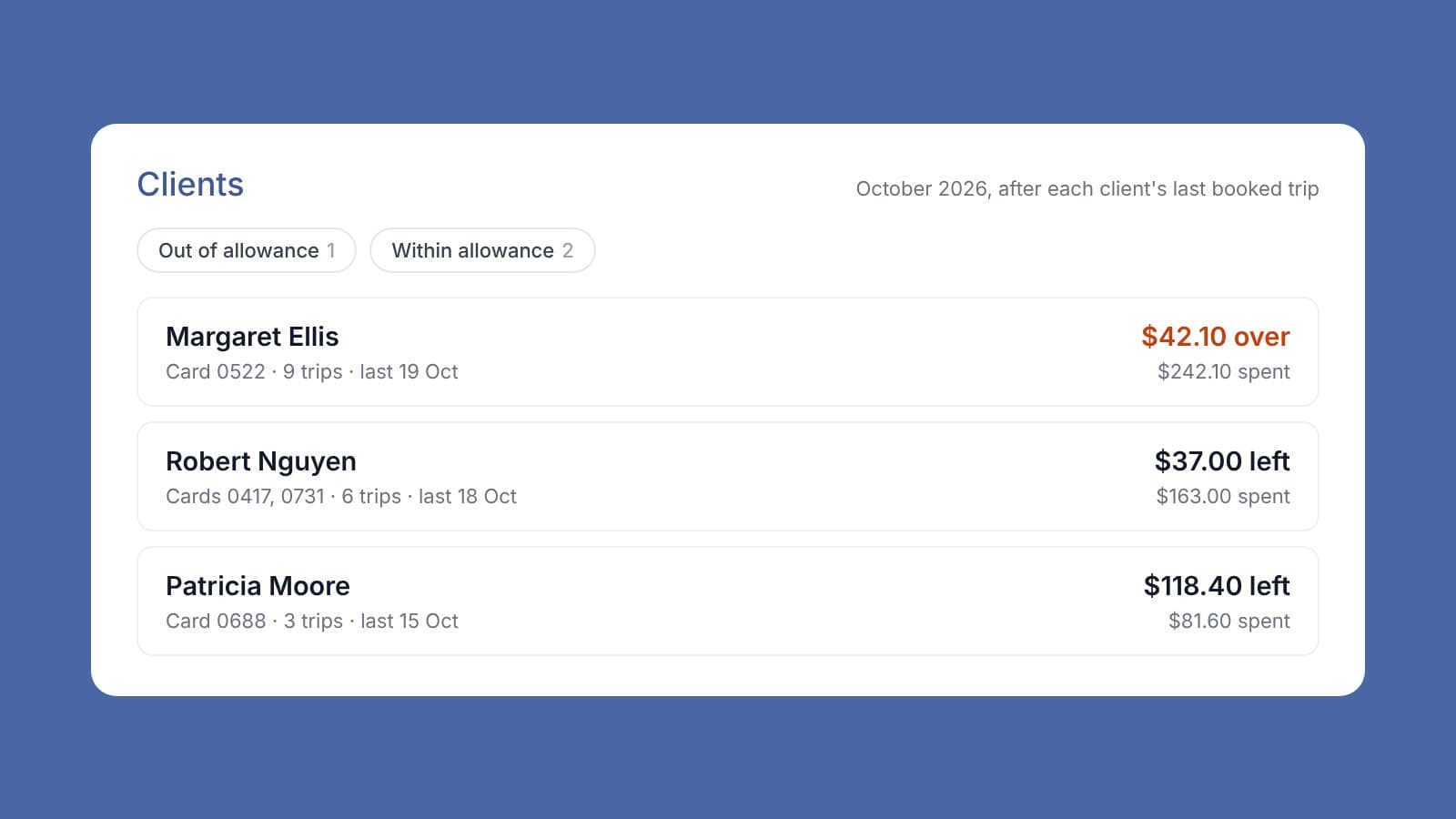
Your clients' taxi trips come straight in from Cabcharge and are booked to the right client automatically. You can see how much of each client's transport allowance is left this month, and who has gone over.
Why taxi trips are hard to keep on top of
Under Support at Home, a taxi trip is a client service like any other. It has to be recorded against the right client and come out of their funding. With Cabcharge, the trips for every card arrive together on one monthly statement. Someone has to work out which client each card belongs to, book each trip, and keep track of how much of each client's allowance is left. By the time the statement arrives, the month is over.
What Invoice Harbour does
- Shows what each client has left. The Clients view lists every client with a trip this month, least allowance left first, with their cards, trips and spend. It flags anyone who is out of allowance.
- Pulls trips from Cabcharge automatically. No statement to work through and no trips to manually enter.
- Matches each trip to the client by card number. Cards are registered once in Settings. A client can hold more than one card, and all their cards share one allowance.
- Books each trip in your care platform. Every trip becomes its own line on the client's Cabcharge purchase order, with a supplier invoice, described by its pickup and drop-off suburbs, for example "Taxi: Hamilton to Charlestown".
- Draws down the monthly allowance. Each trip comes off the client's allowance line for the month at its cost ex GST, and the client price is set by your usual loading and overhead, as for any other line.
A trip that goes over the allowance is still booked, because the trip has already happened. The client shows as out of allowance, so you can follow it up.
When a trip cannot be booked on its own, Invoice Harbour does not guess. An unregistered card, a client with no purchase order, no allowance line for the month, or more than one order that could match: each is flagged for your team with the reason.
Questions you might have
Which trips are booked? Card trips, on physical and digital Cabcharge cards. Pre-booked eTICKET trips are left alone and show as skipped.
Where does the monthly allowance come from? From an allowance line on the client's Cabcharge purchase order. Each month needs its own line. If a month has no line, that month's trips are flagged for your team.
Does this go to my finance system? No. Trips are booked in your care platform. The monthly Cabcharge statement is still paid as usual.
What trip details are kept? The date, the cost and GST, the card number, Cabcharge's transaction number, and the pickup and drop-off suburbs. Full addresses and routes are never stored.
Who can change cards? Team members with the Manage CabCharge permission. The same permission is needed to clear flagged trips.
How do we get it? It is not switched on by default. Talk to us and we will set it up with you.
If you pay for client transport with Cabcharge, talk to us about setting it up.