Supplier invoice processing for Australian care providers
Invoice automation built for Support at Home. Cut hours of processing, and never lose sight of a client budget or your service margin.
- Every invoice line captured the moment it lands in your inbox
- Purchase order and client budget matched before you approve
- Service margin worked out on every line
- Published to your care platform and finance system in one step

“40 hours a week down to 8.”
Mark, owner · Home Care Assistance Newcastle
Every supplier invoice, in three steps
Forward the invoice. Approve it with the budget in view. It lands in both systems.
Every line extracted and coded
The moment an invoice lands in your inbox, every detail is extracted automatically, so your team approves instead of typing.
Budget and margin in view before anyone approves
Each invoice matched to its purchase order and the client’s remaining budget, with your service margin worked out on every line.
One approval, published to both systems
The approved invoice goes to your finance system to pay the supplier and to your care platform to bill and claim. No re-keying.
What Invoice Harbour does with every invoice
Automated invoice extraction
Vendor, invoice details and every line item read the moment the invoice lands in your inbox, with possible duplicates flagged.
Learn more →Supplier checks
ABN, GST registration and bank details checked on every supplier, with anything that does not match flagged before approval.
Learn more →Purchase order matching
Each invoice checked against the purchase order raised in your care platform, within tolerance, before approval.
Learn more →Client budgets
The client’s remaining funding shown as you process, so nobody approves a service that overspends it.
Learn more →Service margins
Your service rates applied to every line, with the margin worked out per line and across the invoice.
Learn more →Service coding
Every line mapped to its service code as it is read, so claims are ready to submit and stop bouncing.
Learn more →Publishing
One approval sends the invoice to your finance system for payment and your care platform for billing.
Learn more →Self-managed participants
Invoices from participant-chosen workers coded, the capped overhead applied, and the reimbursement raised net of co-contribution.
Learn more →Support at Home
The compliance picture, handled as part of the workflow
Support at Home tightened how providers track third-party spend. Each of these is covered by normal day-to-day processing, not a separate exercise.
Budget tracking, every pool
Remaining funding is in view at approval, across the quarterly budget and the AT-HM pools.
Unspent funds, always current
Invoices are matched to purchase orders as they arrive, so the unspent position is right day to day.
Service type coding
Every line is coded to its Support at Home service type, so claims are correct the first time.
Monthly client statements
Services delivered, remaining funding and contributions are already reconciled when the statement is due.
Participant contributions
Contribution rates are held per client, so the government and participant split is right on every invoice.
Audit-ready records
Each invoice keeps who approved it, when, against which purchase order and with which codes.
Customer stories
All stories

No need for another finance hire
“Like all businesses transitioning to Support at Home, the financing behind it was probably one of the biggest problems we were facing, and Invoice Harbour has single-handedly solved it.”
Geoff Doherty · Owner · 101 Home Care


Support at Home, 100 times easier
“I don't know how I could have done invoicing without something like Invoice Harbour.”
Kate · Finance Manager · Ideally Home Care


The missing link between Lookout and Xero
“It has reclaimed my time, given us deeper insights, and allowed us to refocus our energy on supporting our clients.”
Mark & Gemma · Owner & Finance Manager · Home Care Assistance Newcastle
Invoice Harbour versus the alternatives
| Invoice Harbour | Generic accounts payable tools | Manual | |
|---|---|---|---|
| Speed | No typing or entry anywhere | Manually enter care platform | Extract everything by hand |
| Results | Overspend caught first | No client budgets | Overspend found after |
| Success rate | Every line coded to its service code | No service coding | Bounced claims, late pay |
| Ease | One publish, both systems | Finance system only | Download, upload, recheck |
| Experience | Built for care providers | Built for any business | Lives in someone’s head |
| Flexibility | Grow without hiring | No purchase orders | Hire or turn clients away |
| Price or value | Unlimited users, one fee | Plus a person to bridge | A full salary to keep up |
Latest from Invoice Harbour
All posts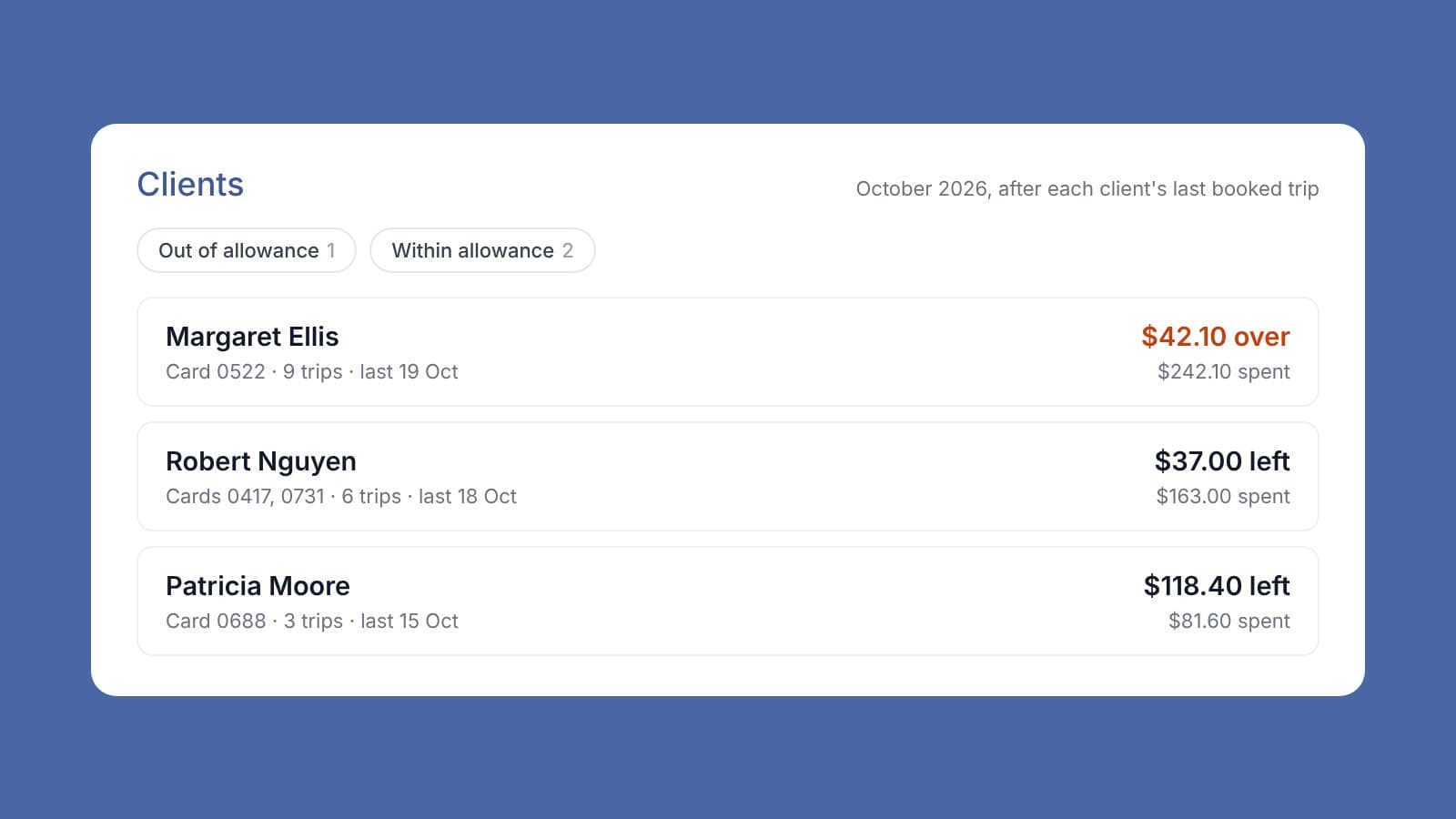
Product
Invoice Harbour now works with Cabcharge
Invoice Harbour now works with Cabcharge. Your clients' taxi trips come straight in from Cabcharge and are booked to the right client automatically. You can see how much of each client's transport allowance is left this month, and who has gone over. If you'd like it set up, talk to us.
Product
Checking the markup on every supplier invoice line
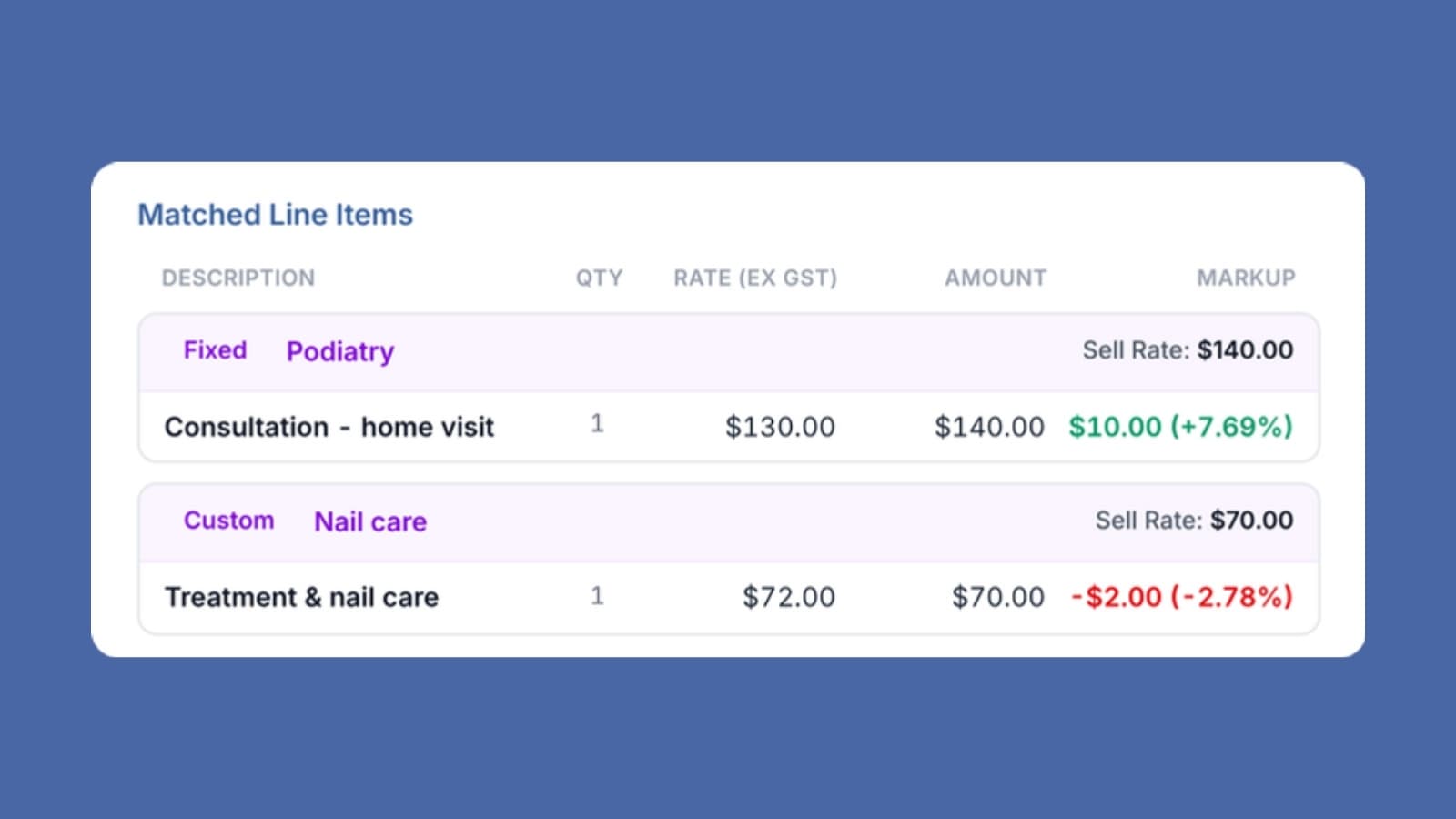
Who in your business knows the markup on a supplier invoice before it's approved, not after the month closes? If the answer is no one, that's a problem. Under Support at Home there's no package management fee to fall back on. The markup on each service pays for the work around it. A supplier rate that creeps up, or a line sold below cost, eats into your margin. Invoice Harbour shows the markup on every supplier invoice before it's approved, so the business can keep every invoice in the green.
Product
Invoice Harbour now works with CareVision
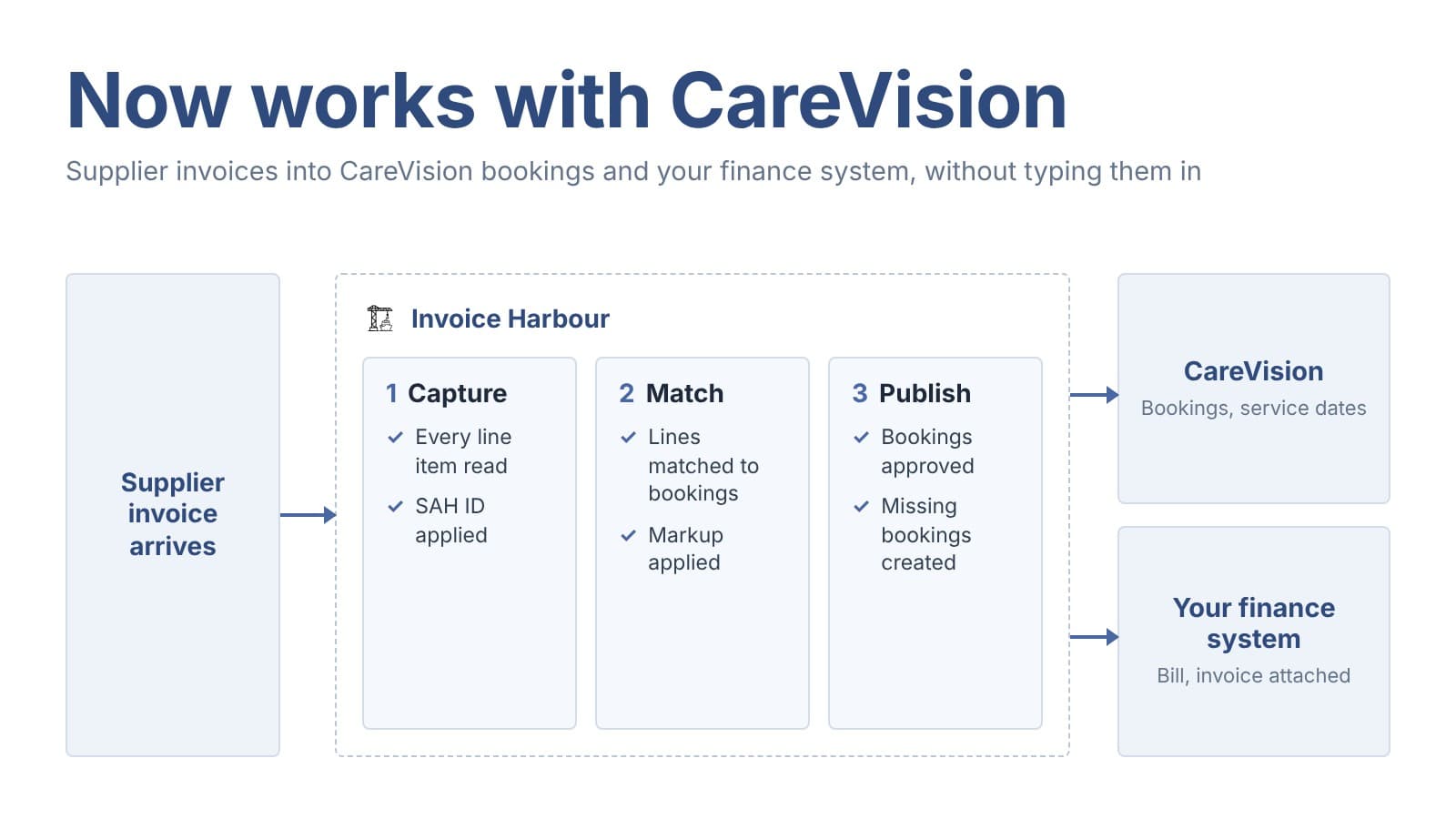
Invoice Harbour now works with CareVision! If you use CareVision, Invoice Harbour can now help you manage your supplier invoices. It processes each invoice, then with one approval updates the client's booking in CareVision and sends the bill to your finance system. Your team does less double handling, and CareVision stays up to date with what was actually billed. Get in touch and we'll show you how it works.
Plans start at $500 a month excluding GST, priced on invoice volume, with unlimited users.
“Like all businesses transitioning to Support at Home, the financing behind it was probably one of the biggest problems we were facing, and Invoice Harbour has single-handedly solved it.”