New in Invoice Harbour: you can now assign an invoice to a member of your team and record notes against it.
Some invoices need input from more than one person, such as confirming hours against the care plan, approving a price, or following up with the supplier. These queries are usually handled by email or chat, separate from the invoice, which makes it difficult to see who is responsible and what was agreed.
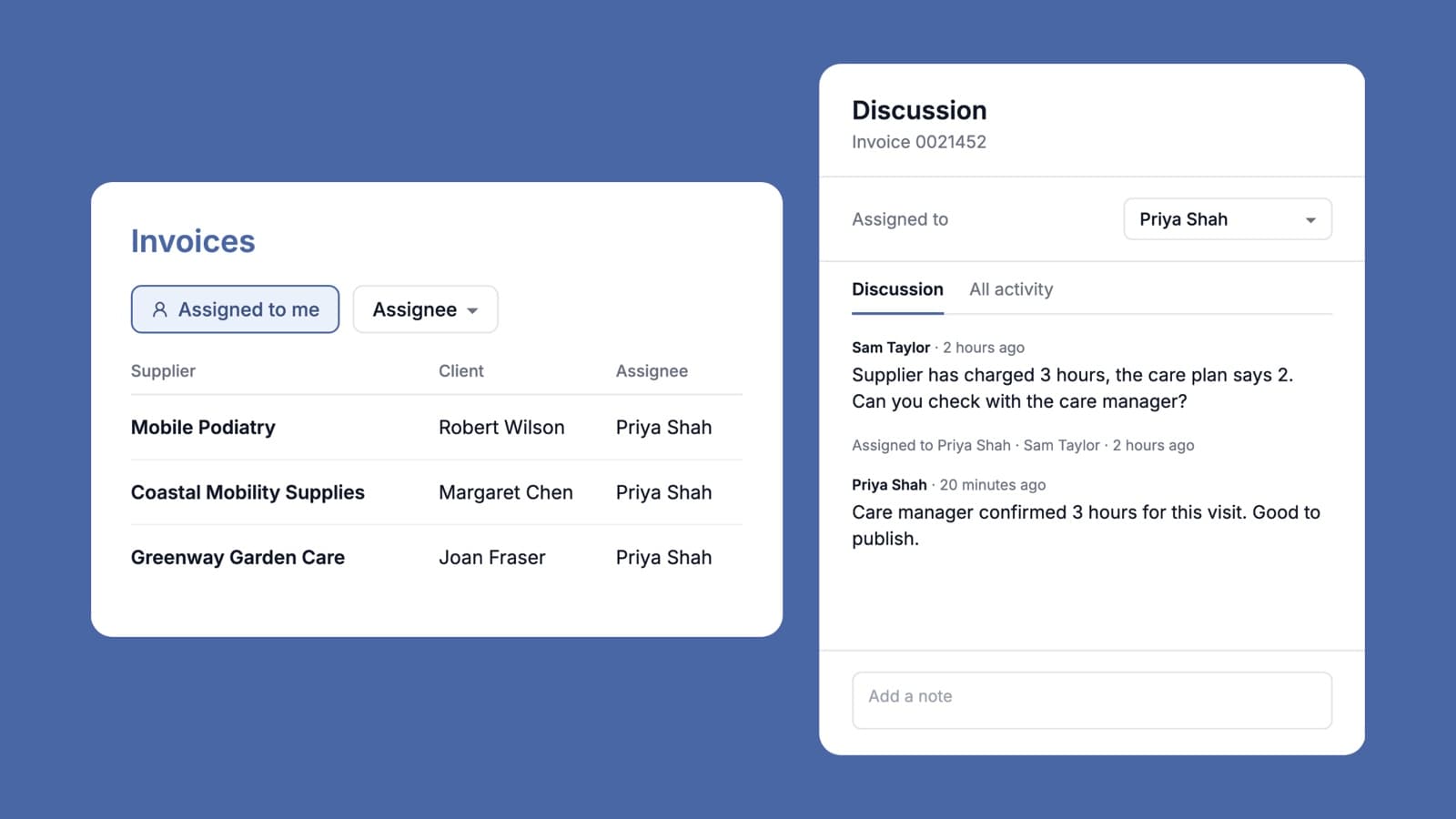
You can now assign the invoice to the person who needs to act on it, with a note explaining what is required. They can find it under Assigned to me. From there they can make changes, reply with a note, assign it to someone else or publish it. Every note and change of assignee is recorded with a name and time, so anyone who opens the invoice later can see who handled it and what was decided.
In the inbox, you can also filter invoices by team member or show those not yet assigned. This makes it easier to divide the workload, or to see what is waiting on someone who is on leave. No setup is required: anyone with permission to edit invoices can assign them and add notes.
Questions you might have
Is it required? No. Nothing changes until someone assigns an invoice or adds a note. Until then, the invoice shows no assignee and no note count.
Does assigning an invoice prevent others from working on it? No. The assignee shows who is responsible for the invoice; it does not restrict access. Anyone with the appropriate permissions can still edit, flag and publish it.
Who can be assigned, and who can assign? Any active member of your team can be assigned an invoice, and you appear first in the list. Anyone with permission to edit invoices can assign them and add notes. Other team members can read the notes.
Is the assignee notified by email? No. Assigned invoices appear under Assigned to me in their inbox. On the invoice itself, they can see who it is assigned to and how many notes it has.
How is this different from the flag? The flag still marks an invoice that needs attention, with a single reason. Notes keep a full record of the conversation in order, showing who wrote each one and when. An invoice can be flagged and assigned to the person responsible for resolving it.
Are notes sent to the finance system or care platform? No. Notes remain in Invoice Harbour and are not included when the invoice is published. They are only exported if you select the note columns in the inbox export.
What happens once an invoice is published? The assignee is kept as a record of who handled the invoice and can no longer be changed. Notes can still be added to published and archived invoices, for example when a supplier follows up about payment.
Can I report on assignees and notes? Yes. The inbox includes an Assignee column, and the export has optional Assignee, Latest Note and Latest Note At columns. These are off by default and can be selected when you export.
If there is anything else that would help your team manage invoice handoffs, please let us know.
Get the Invoice Harbour Update
New features, customer stories and Support at Home changes that affect supplier invoices.
Unsubscribe any time. See our privacy policy.