Most teams check a new supplier once, when they are set up. After that, every invoice is paid on trust. The ABN could have been cancelled, the supplier could have dropped off the GST register, or the invoice could be asking for payment into an account nobody has seen before. None of that is visible on the invoice itself.
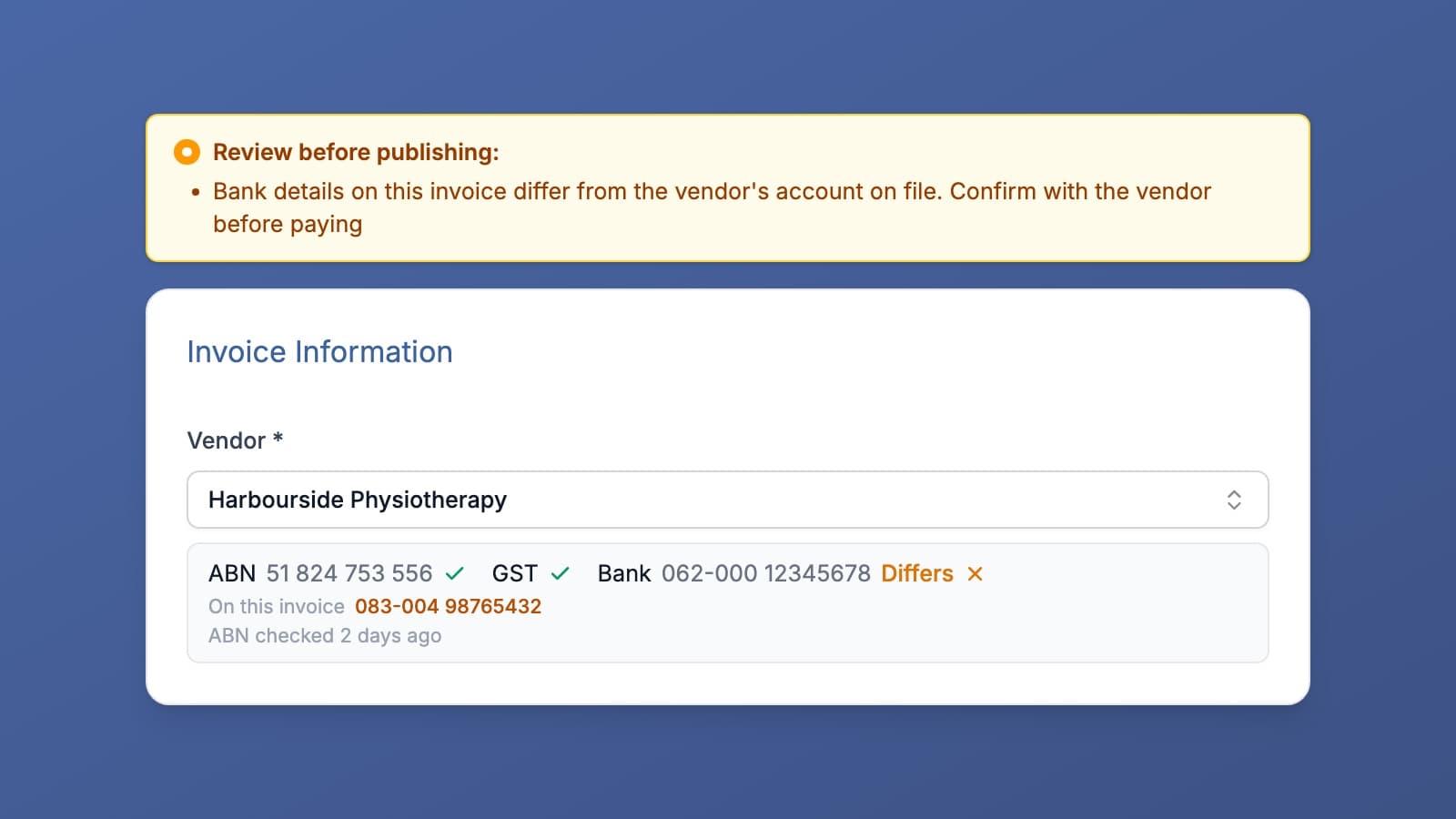
Invoice Harbour now shows all three on the approval screen, for every invoice. The supplier checks page shows the panel.
What gets checked
ABN. The supplier's ABN is looked up on the Australian Business Register (ABR). You see whether it is active, cancelled, or not on the register at all. If the ABN on the supplier record has changed since it was last checked, that is shown too, so an old result is never mistaken for a current one.
GST. Whether the supplier is currently registered for GST, according to the ABR. A supplier that is not registered is not a problem on its own. Plenty of small suppliers sit below the threshold. The warning is for the combination that matters: the invoice charges GST, but the supplier is not registered to charge it. That is GST you cannot claim back.
Bank details. The account the invoice asks to be paid into, compared with the supplier's account on file in your finance system. A mismatch is the signal behind payment redirection scams, where a genuine supplier's invoice arrives with someone else's bank details on it. It is also how honest mistakes get caught, like a supplier who has changed banks and not told you.
Where you see it
The summary sits under the Vendor field on the approval screen, one item per check, with when the ABN was last checked. If anything does not line up, a warning appears at the top of the invoice before you publish.
The warnings are advisory. They never block publishing, because the person approving is the one who knows whether a mismatch is a scam, a typo, or a supplier who genuinely changed banks last week. The point is that they see it before the payment goes out, not after.
Nothing to set up
The ABR lookup runs when a supplier's invoice arrives and the result updates in place once it lands. It is kept for 30 days, so a supplier who invoices you every week is not looked up every time. The bank comparison runs on every invoice. There is no register to maintain, no supplier to re-enter, and nothing to switch on.
If there are other checks you would find useful at approval time, tell us.
Get the Invoice Harbour Update
New features, customer stories and Support at Home changes that affect supplier invoices.
Unsubscribe any time. See our privacy policy.